A recipe calorie calculator that works on any recipe
Most calorie apps count packaged foods with barcodes. A home recipe has no barcode: it has "2 cups of flour", "a handful of parsley" and "serves 4 to 6". Working out the calories per serving by hand means looking up every ingredient, converting units and dividing, and almost nobody does it twice.
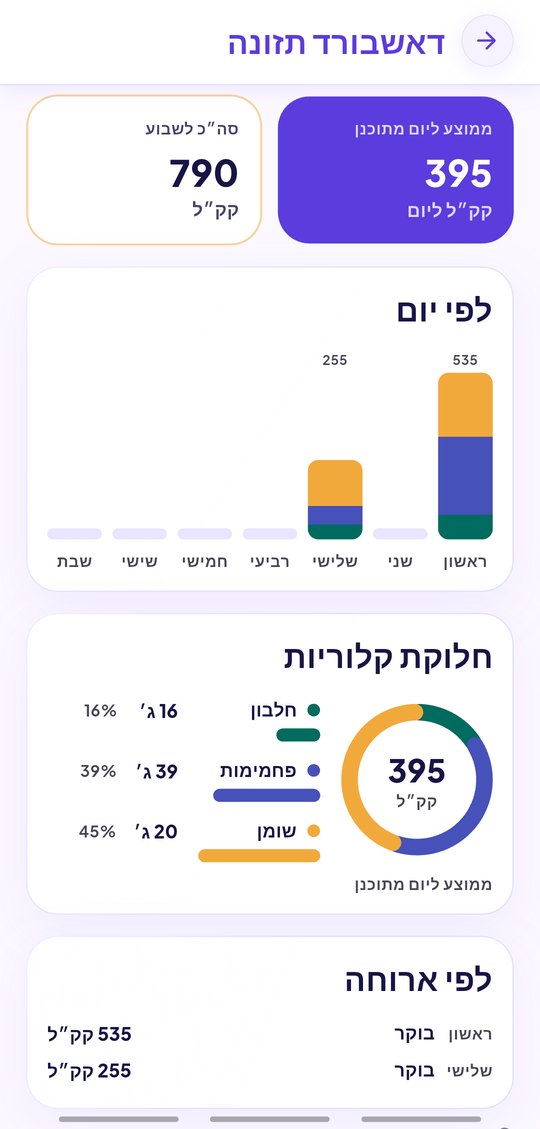
EasyPlate estimates nutrition for every recipe you save, automatically. The AI reads the ingredient list with its amounts and the number of servings, and returns calories, protein, carbohydrates and fat per serving. Change the servings or an amount and the numbers follow. The week’s plan then adds up into a nutrition dashboard, per day and per week.
3 min read
Free to start. No credit card needed.
What is calculated, and how
The estimate is made from the ingredients as written, not from a photo of the plate:
- Calories, protein, carbohydrates and fat per serving.
- The servings count on the recipe decides the division; set it to what you actually get.
- Scaling a recipe to more or fewer servings keeps the per-serving values and recalculates the total.
- Ingredients without an amount ("salt to taste") are treated as negligible.
From one recipe to the whole week
Because every recipe carries its nutrition, a weekly meal plan built from recipes carries it too. The nutrition dashboard shows each day’s totals and the week’s, so you can see at a glance whether Tuesday is all carbs or where the protein is missing.
- Per-day and per-week totals from the meal plan.
- Quick items without a recipe can be given values by hand.
- Shared plans show the same numbers to everyone in the family.
- Nothing to log after eating: the plan is the log.
An estimate, honestly labelled
The numbers are an AI estimate from standard ingredient values, not a laboratory analysis. They are good enough to compare recipes, spot a very heavy dinner or plan a balanced week; they are not a substitute for medical advice, and allergens are listed separately so a nutrition line never hides one.
- Every value is editable if you know better.
- Allergens and dietary tags (vegan, gluten-free, kosher-style categories) sit next to the nutrition.
- Works in Hebrew, English, Arabic, French and Russian.
How it works
-
01
Save or paste a recipe
From a link, a video, a PDF, a voice note or your own typing. The ingredients and servings are what the calculator needs.
-
02
Read the nutrition line
Calories, protein, carbs and fat per serving appear on the recipe. Adjust servings or amounts and watch them update.
-
03
Plan the week
Put recipes on the days of the week and open the nutrition dashboard for daily and weekly totals.
Frequently asked questions
Do I have to type the ingredients?
No. Any recipe EasyPlate extracts from a link, video, PDF or voice note already has its ingredients and amounts, and the nutrition is estimated from them.
How accurate are the calories?
They are estimates from standard values per ingredient, so expect them to be close, not exact. Brands, cooking losses and portion size all move the real number.
Can I correct a value?
Yes. Servings, amounts and the nutrition values themselves are all editable on the recipe.
Does it count what I ate?
EasyPlate counts what is planned: the meal plan’s recipes add up into daily and weekly totals. It is not a food diary with a barcode scanner.
Is it free?
Nutrition estimates are part of saving a recipe. A free account has a daily allowance of AI extractions; EasyPlate Pro removes it.
More guides

Know what a serving costs you.
Download EasyPlate and save a recipe to see its nutrition.