A family cookbook that everyone can open and add to
Every family has the same archive: a notebook in one kitchen, a WhatsApp thread with photos of handwritten cards, a voice note from grandma explaining the kubbeh, and three people who each have "the real" version of the cholent. None of it is in one place, and none of it is searchable.
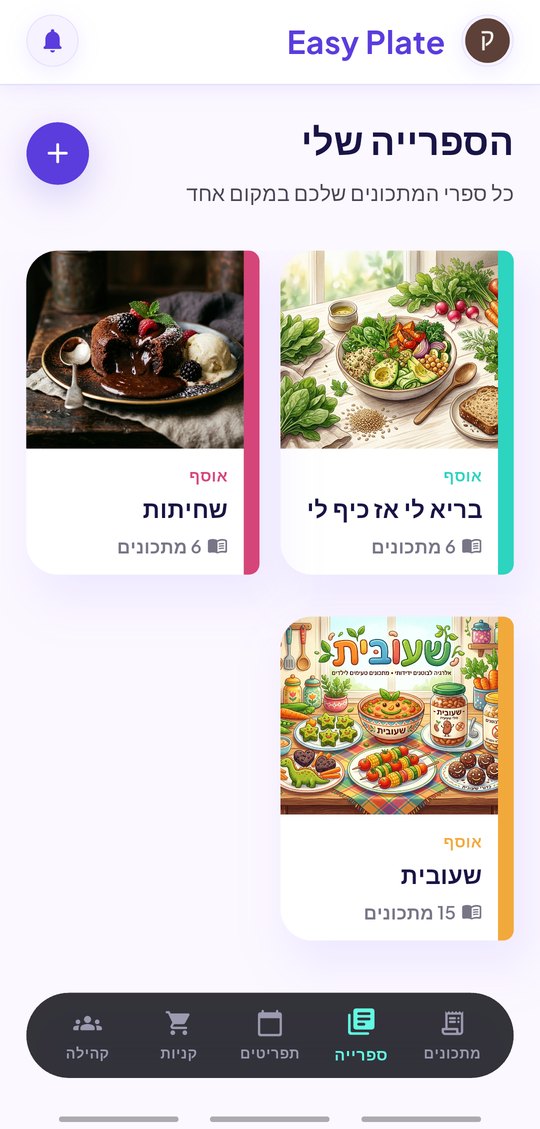
EasyPlate turns that archive into shared cookbooks. Each person saves recipes from wherever they have them: a dictated voice note, a PDF, a link, a video, or typing. Recipes go into books that are shared with the family as viewers or editors, and every change reaches everyone in real time. The book is also a real book: a two-page spread you flip through, with a cover you pick.
3 min read
Free to start. No credit card needed.
Getting the old recipes in
The hard part of a family cookbook is the first fifty recipes. EasyPlate takes them in whatever form they already exist:
- A voice note: record grandma, or share a WhatsApp voice message, and it is transcribed into ingredients and steps.
- A PDF of a typed collection, read as a whole file.
- A link to a blog or a video, for the recipes that were never written down at home.
- Typing, with the AI filling in servings, tags and nutrition.
One book, many hands
A cookbook is shared with a contact (email or phone), with a code, a link or a QR you show at the table. Viewers read; editors add and change recipes. The owner can remove anyone, and anyone can leave. Recipes inside a shared book stay in sync: an edit made by your sister shows up on your phone.
- Viewer or editor, per person.
- Share by contact, code, link or QR.
- Live sync of every recipe in the book.
- Each recipe keeps its own photo, servings, tags and nutrition.
The whole household on one account
For a family that cooks from one kitchen, EasyPlate Pro Duo and Pro Family open a shared household: recipes, books, meal plans, grocery lists and receipts live under the household, every member sees and edits them, and the subscriber’s Pro status covers everyone. Preferences and profiles stay personal.
- Pro Duo: two accounts. Pro Family: up to six.
- Shared recipes, books, plans, lists and price book.
- Join with one code; leave or be removed at any time.
How it works
-
01
Make a book
Name it, pick a cover (a photo, or one the AI draws from a theme) and add the first recipes from voice notes, PDFs, links or typing.
-
02
Share it
Send an invite to a contact, or show a code or QR. Choose whether they read or edit.
-
03
Cook from it
Open the book like a real one, flip to a recipe, scale it to tonight’s table and start Cook Mode.
Frequently asked questions
Can grandma use it?
She does not have to. Record her explaining a recipe, or forward her WhatsApp voice note to EasyPlate, and the AI writes it down. You can read it back to her to check.
Can we import a scanned handwritten card?
Not as a photo yet. Dictate it as a voice note or type it; a typed collection saved as a PDF is read as a file.
Who can change a shared recipe?
Editors can; viewers cannot. The owner of the book decides each person’s role and can change it later.
What happens if someone leaves?
Their copy of the shared book is removed from their device. The book and its recipes stay with the owner and the other members.
Do we need Pro?
Sharing a book is available on a free account, with a limit on how many books can be shared at once. Pro Duo and Pro Family add a shared household for everything.
More guides
Grandma’s recipes, in everyone’s pocket.
Download EasyPlate and start the family book.