How to save a recipe from TikTok, Instagram or YouTube
A recipe in a 40-second video is easy to like and hard to cook from. The amounts are said out loud, the steps fly past, and a week later the video is gone from your feed. EasyPlate turns that video into a real recipe: the AI watches the clip, reads the caption and on-screen text, and returns ingredients with amounts, numbered steps, servings, tags and estimated nutrition.
It works the same way for TikTok, Instagram posts and Reels, YouTube and Shorts, Facebook videos and any recipe website. Below is the full flow, the cases where it needs a little help, and what happens after the recipe is saved.
3 min read
Free to start. No credit card needed.
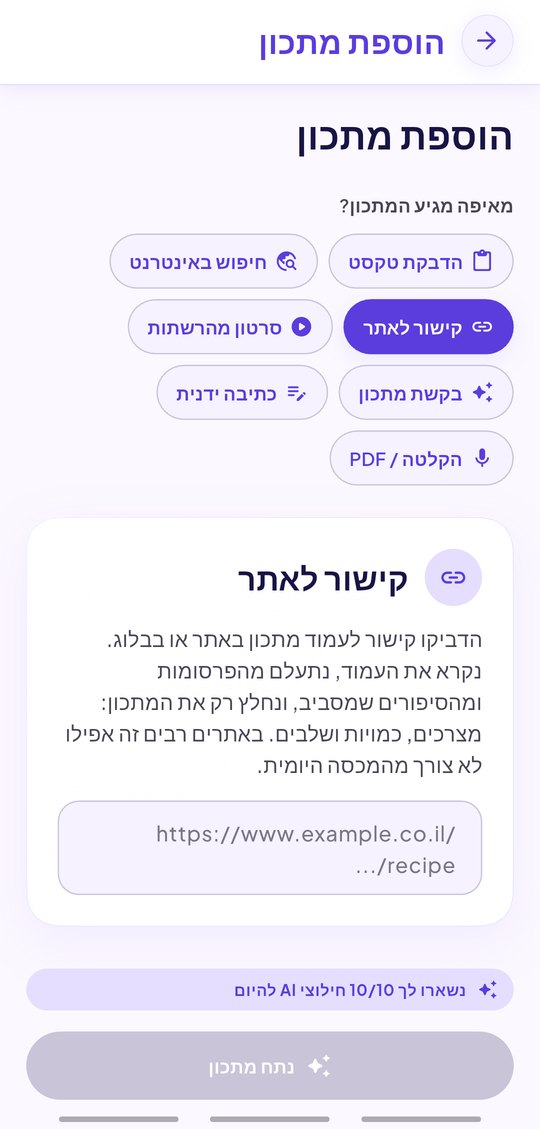
Three ways to send a video to EasyPlate
Pick whichever is fastest in the moment:
- Share sheet: tap Share in TikTok, Instagram or YouTube and choose EasyPlate. The recipe starts extracting immediately.
- Paste the link: copy the video URL and paste it into the search line in the app.
- Paste the caption: for a private account or a video that cannot be fetched, paste the caption text and EasyPlate builds the recipe from that.
What the AI actually does
EasyPlate does not just copy the caption. It analyses the video frames and audio, reads the caption and any on-screen text, and merges them into one structured recipe. Amounts that were only spoken end up in the ingredient list; steps that were only shown end up as numbered instructions.
- Ingredients with amounts and units, in your language.
- Numbered steps, servings, cooking time and tags.
- Calories, protein, carbs and fat per serving, estimated from the ingredients.
- The source link stays attached, so the creator is one tap away.
- Everything is editable before and after saving.
After the video: plan, shop, cook
A saved recipe is not a bookmark. Put it on the weekly plan, and its ingredients join the grocery list, grouped by aisle. Share the book with your family. When it is time to cook, Cook Mode shows one big step at a time with timers that keep running when the screen locks.
- Weekly meal plan with automatic grocery list.
- Shared cookbooks with real-time editing.
- Hands-free Cook Mode with background timers.
- Offline-first: the recipe opens in the kitchen with no signal.
How it works
-
01
Find a recipe video
On TikTok, Instagram, YouTube or Facebook, tap Share and choose EasyPlate, or copy the link.
-
02
Let the AI watch it
EasyPlate analyses the video and the caption and returns a structured recipe in seconds. Check the amounts and save it to a book.
-
03
Cook it this week
Drop it on the plan, shop with the aisle-grouped list, and cook with hands-free steps and timers.
Frequently asked questions
Does it work with private Instagram accounts?
A private video cannot be fetched by link. Paste the caption text instead and EasyPlate builds the recipe from it; if the caption is missing, describe the dish and the AI writes a recipe you can adjust.
Which platforms are supported?
TikTok, Instagram posts and Reels, YouTube and Shorts, Facebook videos and posts, and any recipe website. Pasted text, voice notes and PDF files work too.
Are the amounts accurate?
The AI takes amounts from the audio, the caption and the on-screen text. When a video never states an amount, it estimates one and you can correct it before saving.
Is there a limit?
A free account has a daily allowance of AI extractions, which a short video can extend. Pro removes the limit for ₪20 a month.
Does EasyPlate keep the video?
No. It keeps the recipe it extracted and the link to the original, so the creator is always credited and reachable.
More guides

The next recipe you like is already a recipe.
Download EasyPlate and share your first video to it.