Recipe search that ends with a saved recipe
Searching for a recipe usually ends in twelve open tabs and a screenshot. EasyPlate puts the search inside the app: type a dish, pick a result, and the recipe is read into a clean page with ingredients, steps, servings and nutrition, ready to plan and shop from.
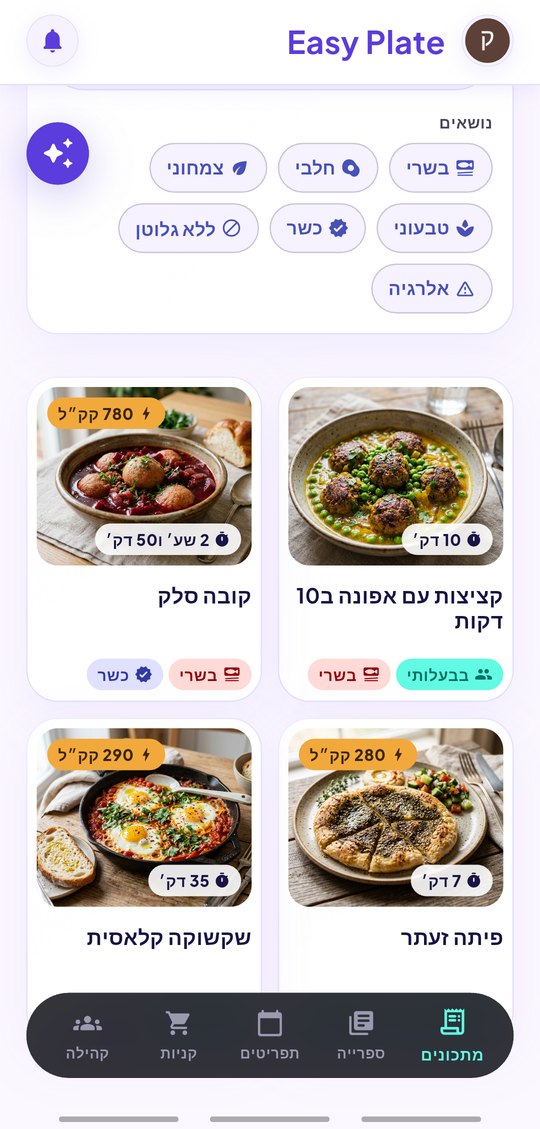
Once recipes are saved, the second search begins: the one inside your own kitchen. The recipes tab finds a dish by name as you type and narrows by diet, so "gluten free" and "vegan" are a tap, not a question. And when neither the web nor your library has what you want, you describe the dish and the AI writes it.
3 min read
Free to start. No credit card needed.
Search the web from inside the app
Choose "Search the web" when adding a recipe, type what you want to cook, and EasyPlate lists matching pages with a title and a short preview. Tap one and the AI reads the page into the recipe format, so there is nothing to copy.
- Results come from the open web, in your language.
- The original page stays linked on the saved recipe.
- Servings, timing and per-serving nutrition are filled in on save.
Find what you already saved
The recipes tab is a search box over your whole library. It matches titles as you type and stacks diet filters on top:
- Dietary filters: vegetarian, vegan, gluten free, dairy free and more, combined.
- Books group recipes by theme, so a search can start from "weeknight" or "holidays".
- Shefi, the assistant, answers "what do I have with chicken?" over the same library.
Nothing fits? Ask for a recipe
The "Ask AI" way in describes what you want in a sentence, such as "a 30-minute chicken and rice dinner for four with no dairy", and comes back with a complete recipe you can edit before saving.
- Allergens and diets you set in your profile are respected.
- Every recipe is translated when you switch the app language.
- The result is a normal recipe: plan it, add it to a list, cook it.
How it works
-
01
Tap the plus and choose "Search the web"
Type the dish. Results appear with a title and a preview.
-
02
Pick a result
The AI reads the page into ingredients, steps and nutrition. Review and save.
-
03
Search your own recipes later
Type a word on the recipes tab, add a diet filter, open the dish.
Frequently asked questions
Does recipe search work in Hebrew?
Yes. Search in Hebrew, English, Arabic, French or Russian; results and the saved recipe follow the language you use.
Can I search by ingredient?
The library search matches recipe names; for "what can I make with eggs and spinach" ask Shefi, who reads your saved recipes.
Does saving a web recipe need the internet?
Yes, for the search and the AI read. Saved recipes open offline afterwards.
Is the search free?
Searching and saving recipes is part of the free app, with a daily number of AI reads that can be extended by watching a short video.
More guides

Search once. Save forever.
Download EasyPlate and find tonight’s dinner.