The recipe app that keeps every recipe you ever liked
Recipes live everywhere now: a reel you liked, a screenshot in your camera roll, a blog with twelve paragraphs before the ingredients, a note from your mother. EasyPlate is a recipe app built to collect all of them into one tidy, searchable cookbook, with the same clean format for each: ingredients with amounts, numbered steps, servings, tags and estimated nutrition per serving.
Instead of typing, you paste or share. The AI reads the video, page, text, PDF or voice note and returns a recipe you can edit. From there every recipe can go onto the weekly plan, into a shared book with your family, and onto the grocery list.
3 min read
Free to start. No credit card needed.
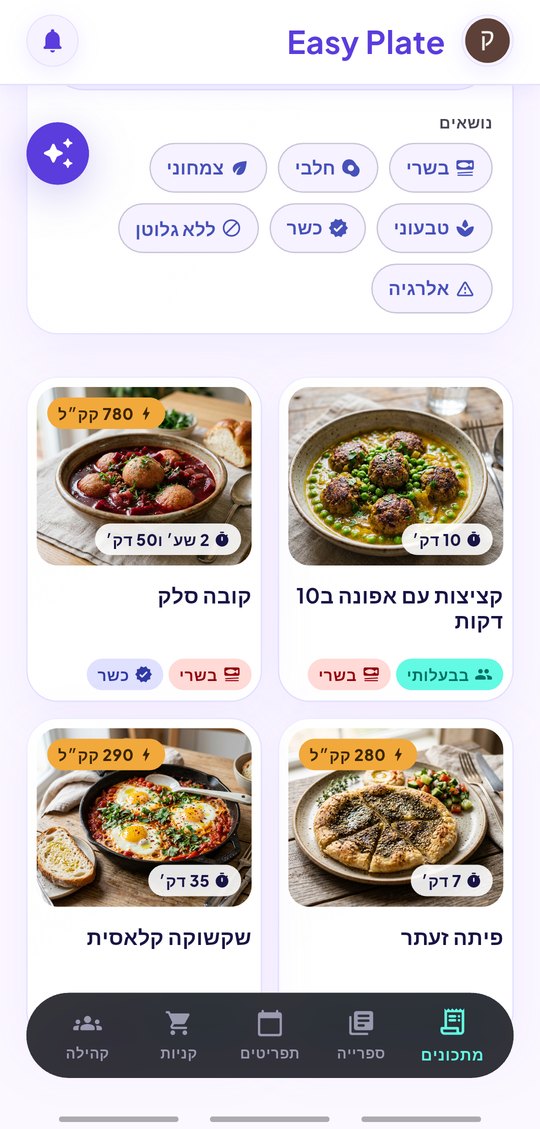
Save a recipe from anywhere
EasyPlate accepts eight kinds of input, and all of them end as the same structured recipe:
- A link from TikTok, Instagram, YouTube, Facebook or any recipe website.
- Pasted text, for example a WhatsApp message or a caption.
- A web search by dish name: EasyPlate finds a recipe and brings it back structured.
- A request in your own words ("a lentil soup for four, no onions").
- A voice note, transcribed and turned into a recipe.
- A PDF file, read as a whole document.
Organize recipes into cookbooks
Recipes are grouped into books you name yourself: weeknight dinners, holiday menus, the kids’ favourites. Books have a two-page spread you flip through, a cover photo, and tags and search across everything. A book can be shared with another account as a viewer or an editor, and edits reach everyone in real time.
- Tags, servings, cooking time and allergens on every recipe.
- Full-text search across your whole library.
- Shared family cookbooks with live editing.
- Offline-first: everything you saved opens without a connection.
Cook with your hands free
Cook Mode turns a recipe into large, step-by-step screens with the ingredient amounts right where you need them and timers that keep running in the background. Nutrition per serving is estimated for every recipe and summed into a weekly dashboard, so planning healthier meals does not require a second app.
- Step-by-step cook mode with background timers.
- Calories, protein, carbs and fat per serving.
- Scale servings and the amounts follow.
- Five languages, including full right-to-left layouts in Hebrew and Arabic.
How it works
-
01
Share or paste
Found a recipe? Use the share button in TikTok, Instagram or your browser and pick EasyPlate, or paste the link, text or file into the search line.
-
02
Review the recipe
The AI returns ingredients, amounts, steps, servings, tags and nutrition in seconds. Edit anything, then save it into a book.
-
03
Plan, shop, cook
Drop the recipe on a day of the week. The grocery list builds itself, grouped by aisle, and Cook Mode walks you through the steps.
Frequently asked questions
Is EasyPlate free?
Yes. A free account includes unlimited manual recipes and books, the weekly plan and the grocery list, plus a daily allowance of AI extractions. EasyPlate Pro raises the daily AI allowance and removes the ads for ₪29.90 a month, billed through the App Store or Google Play.
Which recipe sources are supported?
TikTok, Instagram, YouTube, Facebook, any recipe website, pasted text, web search by dish name, written requests, voice notes and PDF files.
Can I edit a recipe after the AI extracts it?
Everything is editable: ingredients, amounts, steps, servings, tags, photo and nutrition. The AI output is a starting point, not a lock.
Does it work in Hebrew?
Yes. EasyPlate runs in Hebrew, Arabic, English, French and Russian with right-to-left layouts, and switching the language also translates your saved recipes, books, plans and lists.
Can my family use the same recipes?
Share a single recipe, a whole book or a weekly plan with another account as a viewer or an editor. Changes sync to everyone in real time.
More guides
Your recipes, finally in one place.
Download EasyPlate and save the next recipe you see.