A weekly meal plan the whole family can see
The question "what’s for dinner" costs a family a decision every evening and a supermarket run every other day. A weekly plan answers it once: seven days, the meals on each, the shopping done in one trip. The catch is that a plan on one person’s phone is a plan nobody else can see or change.
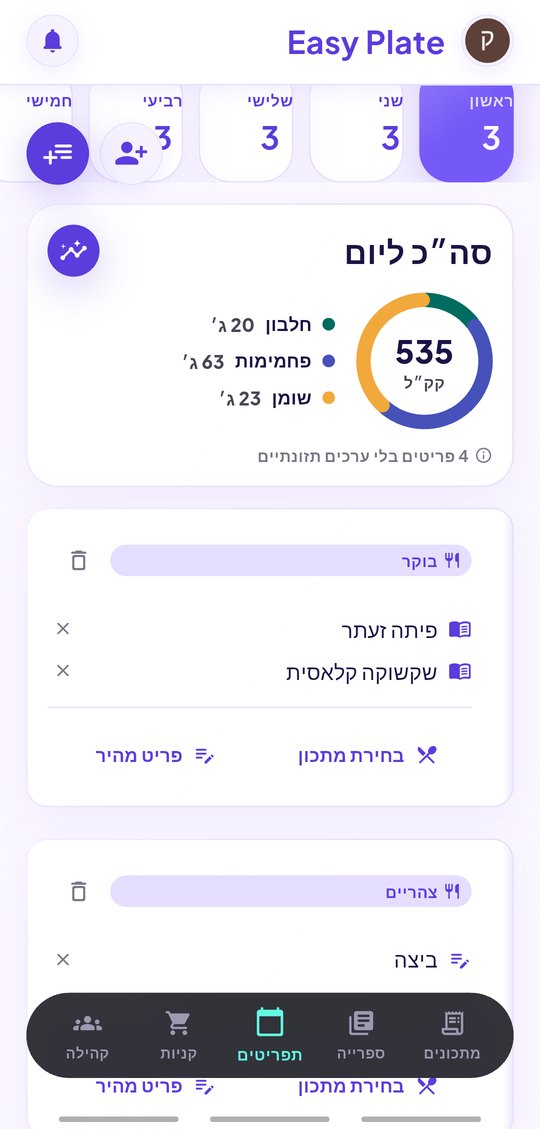
EasyPlate’s meal plans are shared. One person builds the week from the family’s recipes, shares it with the others as viewers or editors, and everyone sees the same board on their own phone. The grocery list is built from the plan, the nutrition adds up per day, and next week starts from a template so the board is never empty.
3 min read
Free to start. No credit card needed.
Building the week
A plan is a board of days and meals. Start from a template, then fill it in:
- Templates: empty, three meals a day, or six (meals and snacks).
- Drop a recipe from your library on any meal, or type a quick item ("leftovers", "pizza night").
- Several plans side by side: a regular week, a holiday week, the kids’ week.
- Change servings on a recipe and the list follows.
One board for the household
Share the plan with a contact, a code or a QR. Editors can move meals and add recipes; viewers can see what is coming and tick the shopping. Changes reach everyone in real time, so the person at the supermarket sees the dinner that was just added.
- Viewer or editor, per person.
- Recipes in the plan travel with it, so everyone can open them.
- Pro Duo and Pro Family keep the whole household on one shared account.
What falls out of the plan
A plan is not only a calendar. From it EasyPlate builds the grocery list, grouped by aisle with duplicates merged across the week, and the nutrition dashboard, per day and per week, from the recipes’ estimated values. Both update when the plan does.
- Grocery list from one plan or several.
- Estimated cost of the list from your receipts.
- Calories, protein, carbs and fat per day.
- Reminders on your shopping day, if you want them.
How it works
-
01
Create a plan from a template
Name it and pick three meals a day, six, or empty.
-
02
Fill the days
Drop recipes from your library or type quick items. Mix both freely.
-
03
Share and shop
Share the plan with the family, build the grocery list from it and go once.
Frequently asked questions
Can two people edit the same plan?
Yes. Share it with edit access and both can move meals and add recipes; the board updates for everyone in real time.
Do I need recipes for every meal?
No. A meal can be a quick item like "sandwiches" with no recipe behind it. Only recipes feed the grocery list and the nutrition.
Can I plan more than one week?
Make as many plans as you like and switch between them; each one is a week board. The grocery list can be built from one plan or from several at once.
Does it work with my own recipes?
Any recipe in your library, including ones extracted from videos or links and ones shared with you by family.
Is it free?
Plans, sharing and the grocery list are free. A free account can share a limited number of plans at once; Pro removes the limit and adds a shared household.
More guides

Decide the week once.
Download EasyPlate and share the first plan with your family.